



Pull up your website on your phone right now.
Does it resize to fit your screen? Can you read the text without zooming in? Are the buttons easy to tap? If the answer to any of those is no — or even "kind of" — you're looking at a site that isn't fully responsive.
Responsive web design is one of those terms that gets used constantly in web design conversations but rarely gets explained clearly. This guide fixes that. Whether you're building a site for the first time, evaluating a redesign, or hiring a web designer and want to know what questions to ask — this is what you need to know.

TABLE OF CONTENTS
- The simple definition
- A brief history (it's newer than you think)
- The three technical pillars
- Responsive vs. adaptive vs. mobile-first — what's the difference?
- Why responsive web design matters
- What a responsive website looks like in practice
- Common mistakes (and what to look for when hiring)
- Frequently asked questions
The Simple Definition: What Is Responsive Web Design?
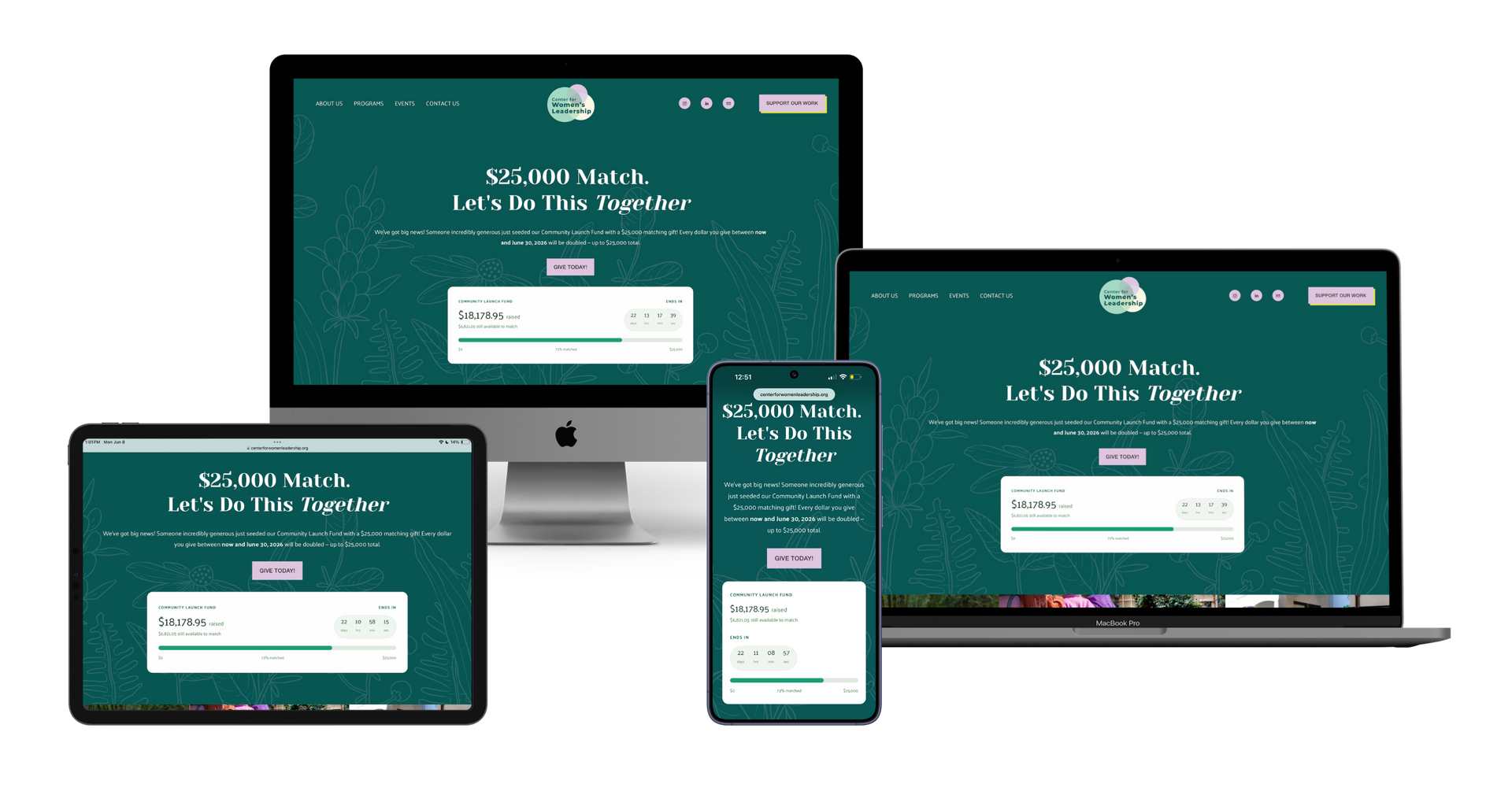
Responsive web design is an approach to building websites where the layout, images, and content automatically adjust to fit whatever screen size is being used — a desktop monitor, a laptop, a tablet, or a smartphone.
Instead of creating a separate "mobile version" of a site, a responsive website is one single site that behaves differently depending on the screen it's displayed on. Bigger screen? The layout expands. Smaller screen? Columns stack, images resize, navigation condenses. Same content. Same URL. Same site. Just adapted for the context.
The term was coined by web designer Ethan Marcotte in 2010. He argued that rather than designing fixed-width pages, designers should think in terms of fluid, proportional layouts that responded to their environment. That idea became the standard for how websites are built today.
A Brief History: Why Responsive Design Became the Standard
Before 2010, most websites were built for a single context: a desktop computer with a monitor somewhere between 1024 and 1280 pixels wide. Mobile browsing existed, but the experience was poor enough that most people just waited until they were at a computer.
Then smartphones became ubiquitous. And suddenly, websites that looked fine on a 24-inch monitor were broken and nearly unusable on a 4-inch screen.
Early solutions were clunky — developers would build a completely separate mobile site, often at an "m." subdomain (m.yourwebsite.com), and redirect mobile users there. Maintaining two sites meant doubled work, inconsistent content, and an inherently worse experience for mobile users.
Ethan Marcotte's responsive design approach offered a better answer. And as mobile traffic grew to surpass desktop traffic — globally, mobile devices now account for over 60% of all web traffic — responsive design went from best practice to baseline expectation.
In 2015, Google made it official: mobile-friendliness became a ranking factor. In 2019, Google switched to mobile-first indexing, meaning it now primarily uses the mobile version of a site to determine rankings. If your site isn't responsive, Google treats it as a lesser site — and ranks it accordingly.
The Three Technical Pillars of Responsive Web Design
You don't need to know how to write code to understand responsive design. But understanding the three core techniques helps you evaluate whether a site is truly responsive — or just mobile-adjacent.
1. Fluid Grids
Traditional websites used fixed pixel widths — elements were set to, say, 960 pixels wide, regardless of the screen viewing them. A fluid grid replaces those fixed measurements with proportional ones — percentages instead of pixels.
So instead of saying "this column is 480 pixels wide," a fluid grid says "this column is 50% of the available space." When the screen shrinks, everything scales down proportionally. Nothing overflows. Nothing breaks.
2. Flexible Images
Images are one of the most common culprits in broken mobile layouts. A photo sized for desktop will blow out of proportion and spill beyond the screen edge on mobile — unless it's told not to.
Flexible images are set to scale within their containers using CSS rules (usually
max-width: 100%
). They'll display at their natural size on large screens and shrink as the container shrinks on smaller ones. They also need to be optimized for different screen resolutions so mobile users aren't downloading massive image files unnecessarily.
3. CSS Media Queries
This is the most powerful pillar. Media queries are conditional instructions written in CSS that tell a browser: "If the screen is this wide, apply these styles. If it's narrower, apply these different styles instead."
For example: on a desktop, a layout might show three columns side by side. A media query at 768 pixels wide might tell the browser to stack those columns into a single column instead. Another query at 480px might increase the font size to stay readable on a small screen.
Media queries are what allow a responsive website to look like a genuinely different — but equally thoughtful — design on each device, rather than just a squished version of the desktop layout.
Responsive vs. Adaptive vs. Mobile-First — What's the Difference?
These three terms are often used interchangeably, but they describe meaningfully different approaches:
Responsive Design
One fluid layout that adjusts continuously based on screen size. The layout reflows smoothly as you resize a browser window. Built with fluid grids, flexible images, and media queries.
This is the modern standard.
Adaptive Design
Instead of one fluid layout, adaptive design uses several fixed layouts for specific screen sizes (usually 320px, 768px, 1024px). The browser detects the screen size and loads the appropriate preset layout. It's less flexible than responsive design and more work to maintain, but can be useful for highly complex UI applications.
Mobile-First Design
Mobile-first is a design philosophy more than a technical method. Rather than designing for desktop and then scaling down, mobile-first design starts with the smallest, most constrained screen and builds up from there. This tends to produce cleaner, faster, more focused websites because it forces you to prioritize what truly matters.
Most well-built responsive websites today are built mobile-first. The two approaches work together.
| Approach | What It Means | When It's Used |
|---|---|---|
| Responsive | Fluid, continuous adaptation to any screen | Most modern websites |
| Adaptive | Fixed layouts for preset screen sizes | Complex applications |
| Mobile-First | Design starts at smallest screen, builds up | Best practice for responsive builds |
Why Responsive Web Design Matters for SEO
Responsive design and search engine optimization are deeply connected. Here's why:
Google uses mobile-first indexing. Since 2019, Google primarily uses the mobile version of your website to index and rank your content. If your mobile experience is broken, thin, or significantly different from your desktop experience, your rankings will reflect that.
Page speed is a ranking factor — and non-responsive sites are almost always slower on mobile. Unoptimized images, extra CSS, and poorly structured layouts all add load time. Google's Core Web Vitals measure things like how fast the largest visible element loads, how stable the layout is as the page loads, and how quickly a page responds to user input. A well-built responsive site addresses all three.
Bounce rate is an indirect signal. Google watches how users behave after clicking a search result. If someone clicks through to your site on mobile, struggles to read or navigate it, and immediately hits the back button — Google sees that. Over time, it affects how your content is evaluated and ranked.
One URL, consolidated signals. When you have a responsive site rather than separate desktop and mobile URLs, all of your backlinks, social shares, and traffic data point to one URL. That consolidated authority helps your rankings rather than splitting it across two domains.
Why Responsive Web Design Matters for Accessibility
Responsive design and accessibility aren't the same thing — but they're closely connected, and the overlap matters.
A site that breaks on mobile often has the same underlying problems that make it inaccessible to people using screen readers, keyboard navigation, or assistive technology. Fixed-width layouts that overflow on small screens. Images without alt text. Touch targets too small to activate. Text with insufficient contrast.
Building responsively — thoughtfully — tends to surface and fix these issues naturally. Fluid text that resizes based on the viewport improves readability for users with low vision. Touch targets sized appropriately for thumbs also work better for users with motor differences. Content that reflows on small screens stays readable for everyone.
Accessibility isn't a compliance checkbox or an afterthought. It's a quality standard. And responsive design is one of the first places it shows up — or doesn't.
What a Responsive Website Looks Like in Practice
Understanding responsive design conceptually is one thing. Recognizing it — and its absence — in the real world is another. Here's what to look for:
| Signs a site IS responsive: | Signs a site is NOT responsive: |
|---|---|
| Navigation collapses into a "hamburger" menu on mobile | Text is tiny on mobile and requires pinching to read |
| Text is readable without zooming on any device | You can scroll horizontally on a phone |
| Images fit within the screen without horizontal overflow | Overlapping elements or cut-off content |
| Buttons and links are easy to tap with a thumb | Desktop layout appears unchanged on a small screen |
| The layout adjusts naturally when you resize a browser window | Slow load times, especially on mobile data |
| Load times are fast on both desktop and mobile | Buttons are too close together to tap accurately |
Common Mistakes in Responsive Web Design (And What to Ask When Hiring)
Not all "responsive" websites are built equally. Here are the most common places responsive design fails — and what to ask a web designer before you hire them.
Mistake #1: Desktop-First Thinking
Designing the desktop version first and then "making it work" on mobile almost always produces a compromised mobile experience. Ask: Do you design mobile-first?
Mistake #2: Ignoring Page Speed
A site can be technically responsive and still be disastrously slow on mobile. Unoptimized images, render-blocking scripts, and bloated themes kill load time. Ask: How do you optimize for Core Web Vitals and mobile page speed?
Mistake #3: Skipping Accessibility
Responsive design and accessibility get treated as separate projects. They shouldn't be. Ask: What accessibility standards do you design to? Do you run an accessibility audit before launch?
Mistake #4: No Testing Across Devices
Responsive design needs to be tested on actual devices — not just browser emulators. Ask: How do you test across breakpoints and real devices before launch?
Mistake #5: No Handoff Plan
A responsive site that requires a developer to update is a liability. Ask: Will I be able to update the site myself after launch? What training is included?
Do You Need Professional Responsive Web Design Services?
You might be wondering whether you can just use a website builder and call it a day. Most modern website builders — Squarespace, Wix, Webflow, Shopify — do produce responsive output by default. So in one sense, yes, any professionally built site should be responsive.
But there's a difference between a site that technically passes a mobile responsiveness check and one that's been designed responsively — where every section, image, heading, and button has been considered at every breakpoint, where typography scales gracefully, where the mobile experience is genuinely good rather than just functional.
There's also a difference between responsive design as a feature and responsive design as part of a larger strategy that includes SEO foundations, accessibility standards, conversion optimization, and a content structure built around how your audience actually searches.
Professional responsive web design services are worth it when:
- You're building or rebuilding a site that needs to drive real outcomes (donations, leads, sales, referrals)
- You've tried a DIY build and the mobile experience is still broken or unconvincing
- Your current site is hurting your search rankings
- Your team needs to be able to update the site confidently after launch
- You want your website to reflect the quality of what you actually do
Frequently Asked Questions
Is responsive web design the same as mobile-friendly?
Mobile-friendly is the broad term. Responsive is the specific method. All responsive websites are mobile-friendly, but not all mobile-friendly sites are fully responsive — some use separate mobile URLs, simplified redirects, or fixed layouts that happen to work on common screen sizes. True responsive design is one flexible, fluid site that works everywhere.
Does responsive web design affect page speed?
Done well, responsive design improves page speed — especially on mobile — because it allows for properly sized images, cleaner CSS, and layouts that don't require heavy workarounds to reformat. Done poorly, it can add unnecessary complexity. Page speed should be considered from the start, not addressed after the fact.
What's the difference between a responsive website and a mobile app?
A responsive website is accessed through a browser and automatically adapts to the device visiting it. A mobile app is a native application downloaded and installed on a device. Most businesses, nonprofits, and creatives don't need a mobile app — a well-built responsive website does everything needed at a fraction of the cost and maintenance burden.
How do I know if my current website is responsive?
The easiest way: open it on your phone. If you have to pinch to zoom, scroll horizontally, or struggle to tap navigation links, it's not fully responsive. You can also use Google's free Mobile-Friendly Test for a technical check.
Is responsive web design still relevant in 2026?
Yes — more than ever. With over 60% of global web traffic on mobile, and Google using mobile-first indexing to rank all websites, responsiveness is fundamental infrastructure. It's not a trend that will be replaced — it's the baseline every site needs to meet.
Ready to Build a Website That Works on Every Screen?
If you're building a new site, planning a redesign, or just realized your current site has some real mobile problems — I'd love to help you think through it.
I offer a free 30-minute discovery call where we look at your current digital presence, talk through your goals, and figure out what makes sense for where you are and where you want to go. No pitch. No pressure. Just a clear conversation.

Don't know where to start? Get your free mini brand audit.
Actionable tips, resources, and feedback to get you moving.